Showing posts with label SliQ Invoicing and Quoting. Show all posts

Sunday, 1 March 2009

SliQ Invoicing 1.6 Released

SliQ Invoicing 1.6 has now been released. Although it's only 6 weeks since version 1.5.1 of SliQTools invoicing software was released, 1.6 is quite a significant update. In 1.6, a number of options have been added to allow customers to modify the provided templates for invoices, quotes and credit notes.

As of 1.6, templates can now optionally include a tax rate column. If desired, the tax value column can now be ommitted and users who are VAT/ tax registered can now choose whether the total column is the gross or net amount. One of the biggest additions to version 1.6 however is a label editor.
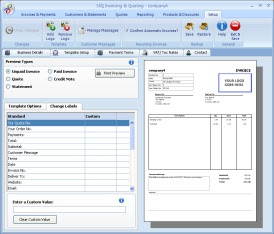

The label editor is provided on the Template Setup tab. The editor lists all the fixed text labels on the selected template preview and lets the user enter their own value. For example, US customers might like to change the Delivery Address label to Shipping Address. Using the new label editor it is even possible to fully translate the standard templates into Spanish, French or German for example.
For futher details of the modifications and additions in SliQ 1.6 and to download the latest copy, visit the SliQ Release History page.

Monday, 15 December 2008

SliQ 1.5 Released

After a few months development SliQ 1.5 has been released and includes a new recurring invoice feature. The recurring/ automatic invoice feature has been in development for the last 3 months. During this time, feedback from a number of users/ potential users was used to guide the implementation. In line with earlier feature additions, the emphasis has been on making recurring invoices as easy to set up as possible.

With two or three mouse-clicks you can now make SliQ Invoicing automatically raise repeat copies of invoices. All you need is select an invoice and check the Recurring? box in the toolbar.

... then confirm the frequency for raising the invoices ...


This will save loads of time for anyone regularly raising repeat copies of invoices, e.g. website designers charging monthly for SEO or website maintenance.

SliQ 1.5 also includes a bulk printing facility. SliQ now tracks which invoices have been printed and allows the user to print all un-printed invoices with a single menu click. This should greatly speed up the monthly billing process for SliQ's users, especially if most of the user's invoces are automatically raised by SliQ using the recurring invoice feature.

Wednesday, 16 July 2008

Beefing up Backup/ Restore Protection

Sometimes the easiest solutions are the best. Rather than worry about whether having Restore buttons on the new Company tab in multi-company SliQ could carry a risk of users overwriting data with data for the wrong company, we've now added an extra check. When the user restores data, we now check if the data being restored is for the same company. If it isn't we let the user know and ask for confirmation before continuing with the restore.

This additional check will also make it into the single-company version of SliQ on the next release.

The actual risk of data loss is quite small. Even if the user does load the incorrect backup file, the daily autobackup will have saved a very recent copy of data in any case.

Tuesday, 8 July 2008

First Review of Multi-Company SliQ

First review of the multi-company version of SliQ highlighted a couple of areas that need reconsideration:-

  1. Upgrading from the single company version. How do you transfer data from one version to the other?
  2. Is it entirely friendly to have a Restore Backup button on the Companies tab?

For point 1, the current idea is that you create a dummy company and then load an SLB (SliQ backup file) into the company overwriting the existing contents. This isn't entirely friendly however, so we may have to add a feature where you can create a new company by opening a backup file.

For point 2, although it seems to be convenient to have the button on the Companies tab, in some ways it's a bit inconvenient - the user could end up overwriting data in the wrong company by mistakenly clicking on the wrong row. Perhaps the easiest, less problematic thing to do would be to remove the save and restore backup buttons from the Companies tab and leave them in the Setup tab and SliQ start menu as in the single company version.

Saturday, 5 July 2008

Multi-Company Version of SliQ

Development of the multi-company version of SliQ is coming to an end. The last thing to be done is to update the help file and write the installer before reviewing and test begins.

The multi-company version adds a new tab (shown on the right) listing the companies SliQ knows about. Simply selecting a company in the list, loads it data into the other tabs.
The bottom panel allows the user to keep notes about the company, e.g. the dates invoicing needs to be done on each month.
When the user adds a new company into SliQ a company setup wizard is launched guiding the user through entering the company details, VAT/ tax registration number and so on. SliQ automatically creates a filename based on the company name and saves the company data.
With any luck, if reviewing and testing goes well SliQ Invoicing & Quoting MC should be released within 2 weeks.

Sunday, 8 June 2008

SliQ 1.4 Beta Test Rework Nearing the End

After almost a month in beta test/ rework, SliQ 1.4 is near complete and should be ready for release this week.

The beta testers provided excellent feedback about the usability of some of the features. This shows the benefits of good, independent, objective testing. It took some motivation to reopen the package and rework some of the features - especially the help file - but I knew the tester was making very valid points.

The new release is ready for final test again. 2 days should do it and then 1.4 will be released in stages over the next week or two.

Sunday, 4 May 2008

SliQ 1.4 Screenshots

These are screenshots of the software package being tested today. SliQ 1.4 is a big update on previous versions. At first glance not much looks different, but 1.4 supports service invoices, discounts on invoices and quotes, 9 different templates in a range of colours, enhanced payment tracking, configurable currencies and taxes plus more.

This is the main Invoices & Payments screen from SliQ Invoicing and Quoting 1.4. The screen has been modified to incorporate the extra payments info.


The template setup tab. On this tab you can choose different templates for your invoices, quotes, credit notes and so on. 9 templates are supported with a range of different colour schemes. 1.4 also allows custom templates to be created for different users.


This tab allows you to enter your business details, select or specify a currency and enter the tax name and standard information like payment options.